Fund Balance & App Themes
Version 2.2.0Released Feb 17, 2026
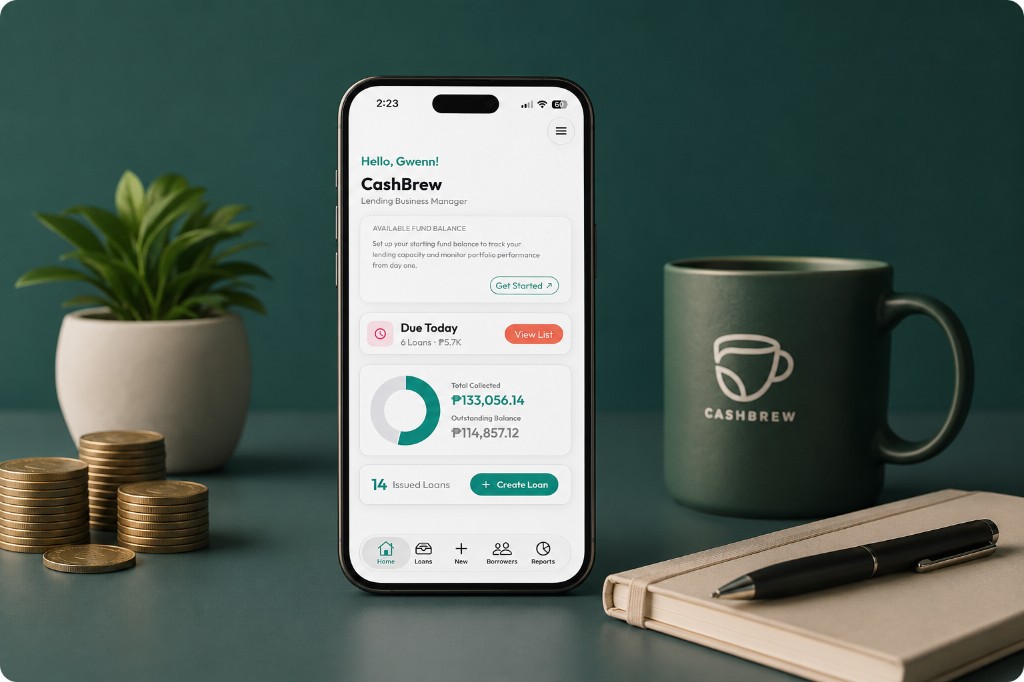
Highlights
- Fund Balance (Beta) shows how much cash you still have on hand, right on your home screen.
- A new Manage Funds screen lets you add money in, take money out, and see every movement in one list.
- New accounts can now set their starting balance during sign-up, so the numbers are right from day one.
- Pick the look you like with the new Theme settings — light, dark, or follow your phone.
- The peso sign (₱) now appears throughout the app instead of a plain letter P.
1) Your money at a glance Beta
Until now, CashBrew could tell you what your borrowers owe you — but not how much cash you actually have left to lend. Fund Balance fills that gap with a card at the top of your home screen.
- See your available funds the moment you open the app.
- The balance updates on its own every time you release a loan or record a payment, so you never have to recompute it in your head.
- Tap the Beta badge any time for a short explainer on what the feature does and what is still being polished.
2) Manage Funds in one place
Money moves in and out of your lending business for all kinds of reasons. The new Manage Funds screen gives those movements a proper home.
- Add funds when you put fresh capital into your lending business.
- Withdraw funds when you take money out for personal or business use.
- Review a clear, running list of every entry, with simple icons and colors that make it easy to tell money in from money out at a glance.
3) Start with the right number
Signing up now includes a quick step to enter your starting fund balance. Instead of beginning at zero and fixing it later, new lenders get an accurate picture of their capital from their very first day on CashBrew.
4) Choose how CashBrew looks
A new Theme screen in your settings lets you switch between a bright light mode, an easy-on-the-eyes dark mode, or have the app simply follow whatever your phone is already set to. Handy for late-night collection runs.
5) Small things that add up
- Amounts now display with the proper peso sign (₱) across the app.
- Due Today and Due Soon stay accurate right after you create or edit a loan — no more stale lists.
- On Android, buttons at the bottom of the loan screens are no longer hidden behind the phone's navigation bar.
- Days to pay is now saved correctly when you create a new loan.
- Deleted loan entries are easier to spot in your funds history.
- Adding or withdrawing an amount now behaves properly on Android, including when the amount is zero.
Behind the scenes
This release also moves CashBrew onto a newer version of its underlying platform, reorganizes the app's internals, and clears out leftover code that was never used. None of this changes what you see, but it keeps the app fast and makes future features quicker to ship.
Get the update
Update to CashBrew 2.2.0 to start tracking your fund balance.


Questions or feedback? Contact support.